The Kids Bank
How I Built a Banking App for My Kids Using AI (And Learned More Than They Did)
I’ve been curious to start seriously building AI, but haven’t had much time or inspiration. Balancing work, three kids and everything else in life was enough. But, the convergence of my parental leave and my oldest child needing a reward system for chores, an idea (thanks Grant Donkervoet) hatchet. Let’s make a “bank” for my son to track his money and learn about saving. With that, Kids Bank was born.
This is the story of how I built a family savings tracker that actually teaches kids how saving works — and my first real experiment using Claude Code to build something from scratch.
The Problem With "Daddy Can Buy Anything"
My 5-year-old has a complete and unshakeable theory of economics: if you want something, you tell mom & dad and they buy it. Where does the money come from? Their phone, obviously. You pick what you want, parent taps the phone, an order's placed, and a few days later the thing arrives. System works great.
The concept that there is a finite amount of money, that it requires work to earn, and that choosing to spend it on one thing means you can't spend it on another — these are, to put it gently, not yet within his comprehension.
I wanted to my child to understand that the value in the money he earned. I wanted him to see it accumulate, watch it grow, and understand that the $5 he earned making his bed and cleaning will eventually become the $5 he'd spend on a Lego set. A spreadsheet felt too abstract. Cash in an envelope felt too easy to lose or ignore. So I did what any reasonable analyst does: I over-engineered a solution, and I used an AI to help me do it.
Wait, You Built This With AI?
Yes — and that was half the point. I wanted to run an experiment at the same time I was solving the allowance problem: could I use Claude Code to build a real, fully-functional, deployed web app for actual daily use? Not a toy project, not a tutorial clone. Something my family would actually open on a Tuesday.
The honest answer: yes, faster than I expected, and in ways that genuinely surprised me. I'd describe the intent, Claude would propose the approach, and I'd make the calls on what to keep. Entire features — the withdrawal request flow, the compound interest projections, the CSV tax export — went from idea to deployed in a single session. The parts where I had to actually think were mostly product decisions, not implementation ones.
It's a different kind of building. Less typing, more directing. I'm still figuring out what that means for how I work, but as a first experiment it was a success.
What I Built
Kids Bank is a web app where parents manage accounts for each child. Every deposit, withdrawal, and interest payment is logged. Kids can see their balance, set savings goals, track chores they've completed, and even submit spending requests for a parent to approve or deny.
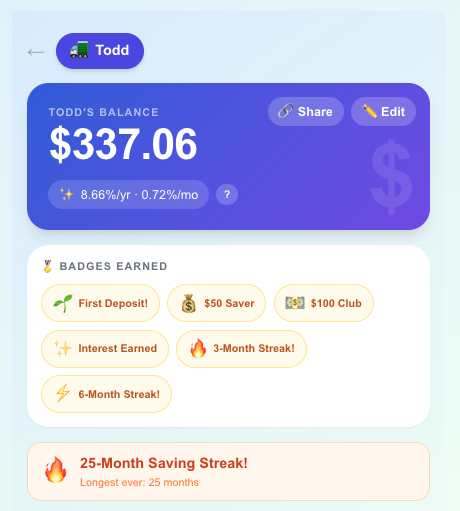
The core features:
Savings goals with a progress bar toward a target amount (a toy, a game, whatever motivates them)
Chores log — complete a chore, earn a deposit automatically
Spending request flow — kids submit a request, parents approve or deny with a note
Monthly deposit streaks and milestone badges to make saving feel like a game
Interest applied manually by parents, with an explanation of how compound interest works
Recurring transactions for allowance — set it once, apply it weekly
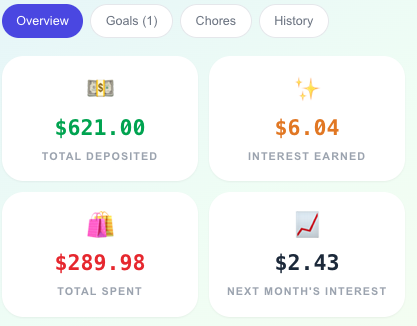
Bank Dashboard with key savings and spending metrics
The Numbers Behind It
This is where it gets interesting for anyone who thinks analytically about money.
The app includes a compound interest projection — plug in the current balance and interest rate, and it shows what that money becomes in 1, 3, 5, and 10 years.
By default, interest rates are set pretty generously - 2x the federal fund rates. It’s exciting for him to see that at an 8% annual rate, the current $366 balance becomes $773 in 10 years. Not life-changing — but to a kid, seeing $10 become $23 without doing anything is the seed of a genuinely useful mental model. Future value, opportunity cost, the magic of time — all of it starts here.
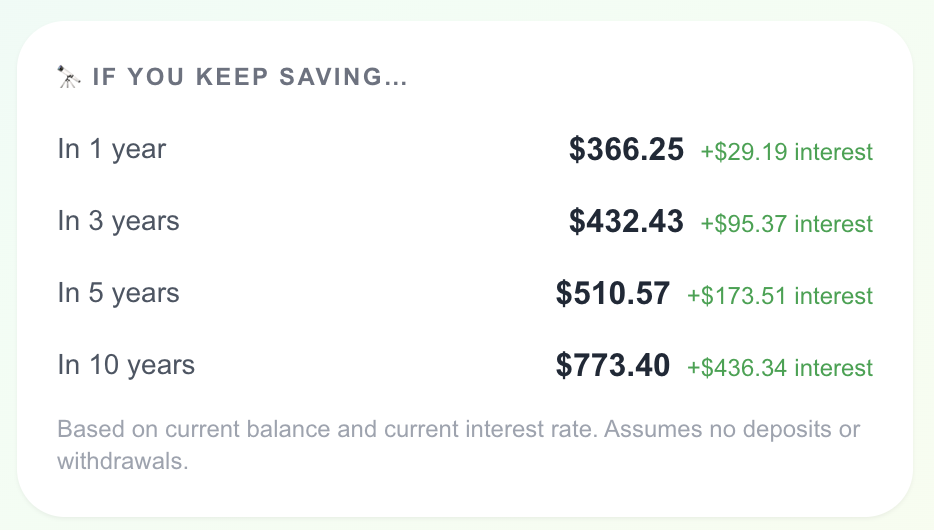
Savings Projections
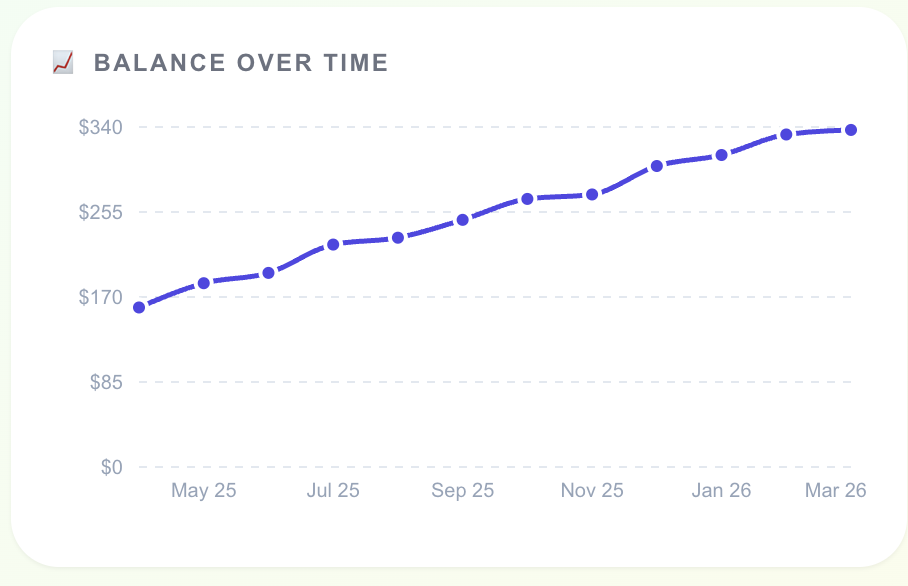
My inner analyst loves the time based views. Simple charts showing how his money’s grown over time make it easy for him to see the value in his savings. The tax summary tab goes further: annual totals broken down by month, with a CSV export. Overkill for most families, but useful if you want to show a teenager an actual spending vs. saving breakdown over a year.
One Important Clarification: This Isn't a Real Bank
Worth saying up front: Kids Bank doesn't open a real account or move actual money anywhere. The balance lives in an app. The real money lives in my account.
That's by design. He's five — a custodial account is a few years away. This is a way to make the concept of money tangible and trackable before he's ready for the real thing. When he earns his $5 for doing chores, I log it. When he wants to spend it, I log that too. The app is the ledger; I'm the bank.
How It Works Under the Hood
The app is built on Next.js and deployed on Vercel, with a Supabase PostgreSQL database. Each family gets a completely isolated account — you register with an email and PIN, and your children's data is scoped entirely to your family.
There's a two-tier auth system: a family session (stays logged in for 30 days) and a parent session (expires after 2 hours). This means kids can check their balance on a shared device without being able to quietly give themselves a $500 deposit.
Badges and streaks are computed live from transaction history — no separate tracking table. The streak logic counts consecutive months with at least one deposit. The badges check milestones like "first deposit," "$100 balance," "3-month streak."
What My Son Actually Thinks
The chore connection clicked faster than I expected. He understands that completing weekly chores (which he very excitedly checks off on our Skylight!) means money goes into the account. He's started asking to check his balance in Target to see if he has enough for that next Lego set. That's the entire lesson right there: money is finite, it comes from effort, and you decide how to spend it.
He still asks how the money comes out. We're working up to that.
Try It Yourself
Kids Bank is open source and free to use. You can deploy your own instance in about 10 minutes with Vercel and a free Supabase database.
If you want to see what an account looks like without signing up, here's a read-only view of a test account: Kid’s Bank (username: demo@kidsbank.app; pin: 1234)
What I'd Build Next
While Kids Bank is working great, there are few things still on the list to make it even better:
Push notifications for recurring deposits
Push notifications when a spending request is approved
A kid-facing mobile view optimized for small screens
The ability for kids to leave notes on why they're saving toward a goal
Eventually: a bridge to a real custodial account when he's ready
But the version that exists today is already doing its job. He checks his balance. He connects chores to money. He's starting to understand that there's a number, and the number goes up when he works and down when he spends.
Built with Next.js, Vercel, Supabase, and Claude Code. Source on [GitHub].
